

Download Teleparty – Free Synchronized Streaming Party Extension
Looking for a reliable way to watch movies, series, or documentaries together with friends and family who live far away? Teleparty (formerly Netflix Party) is a free browser extension that syncs playback across up to 50 participants, adds a built‑in chat, and works with the most popular streaming platforms. Whether you’re planning a weekend binge on Netflix, a Disney + marathon, or a Hulu watch‑along, Teleparty turns a solitary screen into a shared experience without the hassle of manual timing or third‑party video calls.
Overview – How Teleparty Brings Remote Viewing Together
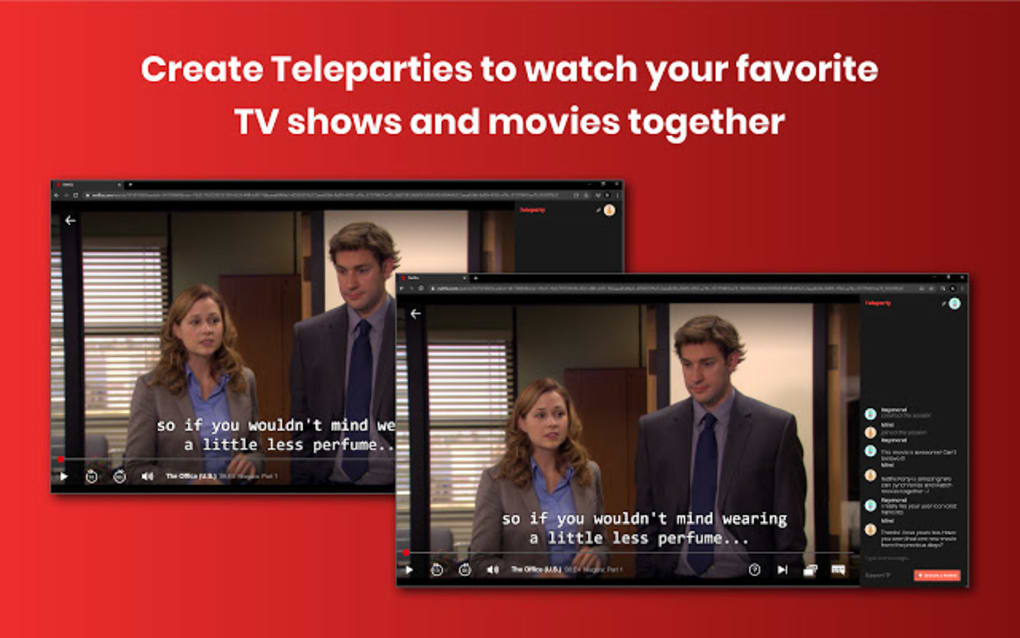
Teleparty is a lightweight, free web browser extension that runs on Chromium‑based browsers such as Google Chrome, Microsoft Edge, and Brave. After installing the extension, users simply launch their preferred streaming service—Netflix, Disney +, HBO Max, Hulu, or others—select the title they want to watch, and click the Teleparty icon to generate a unique URL. This link can be shared with up to 50 participants, who then join the session by clicking the same URL and activating their own Teleparty extension.
The extension automatically synchronizes playback, ensuring that everyone watches the same frame at the same time. A side‑panel chat lets participants type comments, react to plot twists, or even coordinate snack breaks without leaving the streaming site. Because Teleparty does not host any video content itself, it respects the licensing agreements of each platform and requires each participant to have a valid subscription to the chosen service. The tool is especially popular among long‑distance friends, couples, and remote work teams looking for a low‑effort social activity.
Since its rebrand from Netflix Party, Teleparty has added support for more streaming services, improved the UI of the chat panel, and introduced optional host‑only control to prevent accidental pauses or skips. The extension is updated regularly based on user donations and feedback, ensuring compatibility with the latest browser versions and streaming platform changes. While it’s limited to desktop browsers on Windows and macOS, the experience is smooth, secure, and entirely free, making it an essential addition to any digital entertainment toolkit.
Key Features and Benefits of Teleparty
- Synchronized Playback: Automatic frame‑by‑frame sync across up to 50 users, eliminating the need for manual countdowns.
- Built‑in Chat Panel: Real‑time text chat appears beside the video, allowing reactions, spoilers, and casual banter.
- Multi‑Platform Support: Works with Netflix, Disney +, HBO Max, Hulu, and other major streaming services.
- Chromium Browser Compatibility: Available for Chrome, Edge, Brave, and other Chromium‑based browsers.
- Free and Open Source: No subscription fee; the project is maintained through community donations.
- Host Controls: Option for the host to retain exclusive playback control, preventing accidental skips.
- Customizable Nicknames & Avatars: Each participant can set a nickname and profile picture for easy identification.
- Easy Link Sharing: Generates a short, shareable URL that can be sent via messaging apps, email, or social media.
- Regular Updates: Frequent bug fixes and compatibility patches keep the extension reliable.
- Privacy‑Focused: No video data is stored or transmitted by Teleparty; only playback timestamps and chat messages are synced.
These features collectively provide a seamless, interactive viewing experience that rivals dedicated watch‑party platforms while remaining completely free. Users appreciate the simplicity of launching a party with just a click, the reliability of synchronization, and the ability to chat without opening a separate video‑call application. For many, Teleparty has become the default solution for virtual movie nights, study group screenings, and corporate team‑building events.
Installation, Usage Instructions & Compatibility
Step‑by‑Step Installation Guide
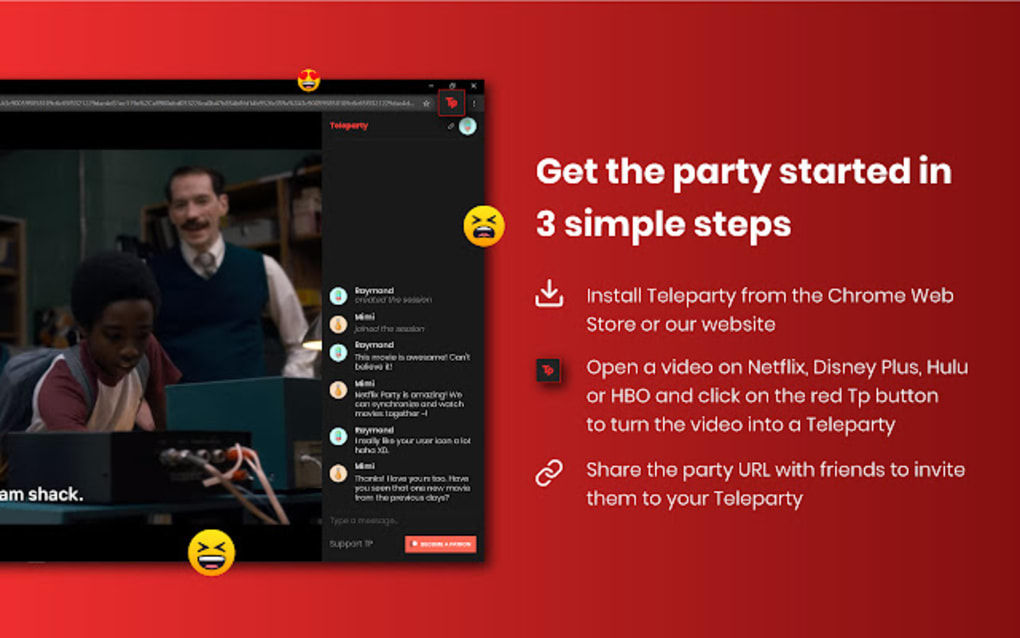
- Open Google Chrome, Microsoft Edge, or Brave and navigate to the Teleparty extension page in the Chrome Web Store.
- Click the Add to Chrome (or Add to Edge) button. A confirmation dialog will appear—select Add extension.
- Once installed, the Teleparty icon (a purple “TP”) appears in the browser’s toolbar. Pin the icon by clicking the puzzle‑piece icon, locating Teleparty, and selecting the pin option for quick access.
- Restart your browser if prompted, then ensure you’re signed into the streaming service you plan to use (Netflix, Disney +, etc.).
Creating and Joining a Party
To start a party, open the title you want to watch, click the Teleparty icon, and choose Start Party. You’ll be presented with two optional settings: “Only I have control” and “Show chat.” Adjust these based on your group’s preferences, then click Copy Link. Share the link with friends via any messaging platform. Participants must have the Teleparty extension installed and be logged into the same streaming service. When they click the link, a small pop‑up prompts them to activate Teleparty, after which playback will sync automatically.
Operating System Compatibility
Teleparty is compatible with Windows 11, Windows 10, and macOS (any recent version that supports Chrome, Edge, or Brave). The extension does not run on mobile browsers, iOS, Android, smart TVs, gaming consoles, or tablets. Users on these devices can still join a party by using a compatible desktop or laptop computer.
Troubleshooting Common Issues
If participants experience desynchronization, ensure everyone has the latest version of the extension and that their browsers are up to date. Clearing the browser cache or reinstalling Teleparty often resolves persistent bugs. For persistent connectivity problems, check that no corporate firewall or VPN is blocking the extension’s communication with the streaming service’s playback API.
Pros, Cons, and Frequently Asked Questions
Pros
- Completely free with no hidden fees.
- Supports multiple major streaming platforms.
- Easy to set up and use for non‑technical users.
- Real‑time chat enhances the shared experience.
- Host‑only control prevents accidental skips.
Cons
- Only works on desktop browsers; no mobile or TV support.
- All participants must have a subscription to the chosen streaming service.
- Limited to Chromium‑based browsers; Firefox users must switch.
- Cannot change playback position after the party starts without creating a new link.
Frequently Asked Questions
Do I need a Netflix account to use Teleparty?
No. Teleparty works with Netflix, Disney +, HBO Max, Hulu, and other services. You only need an active subscription for the specific platform you plan to watch.
Can I use Teleparty on my iPhone or Android tablet?
Teleparty is currently limited to desktop browsers on Windows and macOS. Mobile devices are not supported, though you can join a party using a laptop or desktop.
How many people can join a single Teleparty session?
A Teleparty link can accommodate up to 50 participants, making it suitable for large virtual gatherings.
Is Teleparty secure and private?
Yes. Teleparty does not store video content; it only synchronizes timestamps and chat messages. All data is transmitted over encrypted HTTPS connections.
What should I do if the party gets out of sync?
Ask the host to pause, then have everyone refresh their browser tabs and click the Teleparty icon again. The host can then resume playback, and the extension will re‑synchronize all participants.
Review Summary
Overall Rating: 4.5 out of 5 stars
Teleparty delivers a remarkably smooth and social viewing experience for free. Its simple setup, reliable sync, and integrated chat make it the go‑to solution for remote movie nights. While the lack of mobile support is a drawback, the extensive platform compatibility and host controls more than compensate. Ideal for friends, families, and even small teams looking to unwind together.
Conclusion – Start Your First Teleparty Tonight
If you’ve been searching for a hassle‑free way to watch your favorite shows with loved ones across the globe, Teleparty is the answer. The extension is free, easy to install, and works with the biggest streaming services. By simply adding a link to a chat or email, you can bring together up to 50 participants for a synchronized, chat‑enabled viewing session. Although it’s limited to desktop browsers, the reliability and feature set make it a standout tool for virtual socializing.
Ready to turn your next movie night into a shared experience? Download Teleparty now, invite your friends, and enjoy seamless streaming together—no more awkward countdowns, no more “did you pause?” moments. Happy watching!







